Forum Discussion

camerongreenfield
Feb 24, 2022Copper Contributor
Sorting list of values by adjacent column text
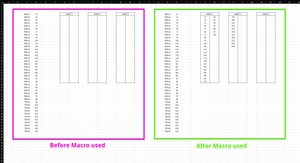
Hi, I am looking to create a vba macro button to sort through a single column range (in the example image it would be column "C") and copy corresponding adjacent cell values (Column "D") to another ...
 Feb 25, 2022
Sub sort() Dim i As Integer Dim j As Integer Dim z As Integer Dim w As Integer Range("G5:MM27").Clear w = 7 z = 0 j = 5 For i = 4 To 300 If Cells(i + 1, 3).Value = Cells(i, 3).Value Then If z = 23 Then If w Mod 3 = 1 Then w = w + 1 ElseIf w Mod 3 = 2 Then w = w + 2 End If j = 5 Cells(j, w).Value = Cells(i, 4).Value j = j + 1 z = 1 Else Cells(j, w).Value = Cells(i, 4).Value j = j + 1 z = z + 1 End If Else If z = 23 Then If w Mod 3 = 1 Then w = w + 1 Else End If j = 5 Cells(j, w).Value = Cells(i, 4).Value Else Cells(j, w).Value = Cells(i, 4).Value If w Mod 3 = 1 Then w = w + 3 Else w = w + 2 End If j = 5 z = 0 End If End If Next i End SubMaybe with these lines of code which seem to work in my spreadsheet. Click the button in cell S2 to start the macro. The macro currently works for entries in range C4:C300 and can easily be adapted to other ranges.

Wildecoyote1966
Feb 25, 2022Brass Contributor
Can you attach a sample file?
Have you considered just writing a formula?
Have you considered just writing a formula?