Forum Discussion

Search formule, in table searching in 2 rows.
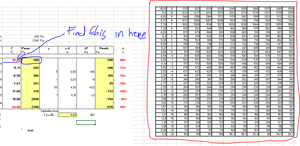
- Oct 04, 2019
Maybe this is what you're after. Try this rather lengthy formula out and let me know if it gives you your desired results:
In Cell G4:
=INDEX($P$4:$Y$60,MATCH(IF(ABS(ROUND($F4-ROUNDDOWN($F4,),1))=1,ROUNDUP($F4,),ROUNDDOWN($F4,)),$O$4:$O$60,0),MATCH(IF(ABS(ROUND($F4-ROUNDDOWN($F4,),1))=1,0,ABS(ROUND($F4-ROUNDDOWN($F4,),1))),$P$3:$Y$3,0))
P.S.
I would love some suggestions to help condense this formula.


And what is the precision for the rounding up? Numbers in you table are results of calculations which shown with 2 digital numbers. For example, 35.4000017 will be shown as 34.40, but if formally round up decimal part it gives 35.5.
It could be round first to two digits and result rounded up to 1 digit, e.g. 35.4000017 -> 35.40 -> 35.40
- Jorn_HOct 05, 2019Copper Contributor
PReagan The formule works for the positive numbers but it does not work for negative numbers so for the first 4 that are negative it's the #N/B error at the point with ROUNDUP. the other 3 work, so thanks for that already!
Edit: After looking around I found out the negative numbers had an other '-' in front so I changed those and it works now! Thank you so much!
- Jorn_HOct 04, 2019Copper ContributorI don't get your question totally so pardon me if I give a wrong answer. In your example you use 35.4000017 it should look it the 2 numbers behind the comma so in this case 40 this means it needs to be 35,4. If it is 35.4501827 it should look again and the 2 numbers behind so 45 so round up to 5