Forum Discussion

Pierre73
Apr 18, 2023Copper Contributor
Script to convert CSV to table
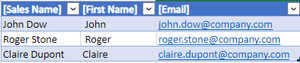
Hello, I am trying to create a script that convert csv to an excel table to use in power automate to send emails from that script. The emails need to be clickebale My csv example [Sales Name],...

NikolinoDE
Apr 18, 2023Platinum Contributor
Example how to change the code to format the cells in email column as hyperlinks:
async function main(context: Excel.RequestContext) {
  // Get the file from OneDrive
  let response = await fetch("<YOUR_FILE_URL>");
  let csvData = await response.text();

  // Get the current worksheet
  let sheet = context.workbook.worksheets.getActiveWorksheet();

  // Split the CSV data into rows
  let rows = csvData.split("\n");

  // Loop through each row
  for (let i = 0; i < rows.length; i++) {
    // Split the row into columns
    let columns = rows[i].split(",");

    // Loop through each column
    for (let j = 0; j < columns.length; j++) {
      // Set the value of the cell
      sheet.getCell(i, j).values = [[columns[j]]];

      // Format the email column as a hyperlink
      if (j === 2 && i > 0) {
        sheet.getCell(i, j).hyperlink = `mailto:${columns[j]}`;
        sheet.getCell(i, j).format.font.color = "blue";
        sheet.getCell(i, j).format.font.underline = "Single";
      }
    }
  }

  // Create a table from the data
  let table = sheet.tables.add(sheet.getUsedRange().getAddress(), true);
  table.getHeaderRowRange().format.fill.color = "#4472C4";
  table.getHeaderRowRange().format.font.color = "white";

  await context.sync();
}
Just hope the file isn't in OneDrive.

Pierre73
Apr 18, 2023Copper Contributor
NikolinoDE
I copy past your script and I have some errors. I see I have to modify <YOUR FILE URL>, but I have errors on line 1, 7 and 32.
- NikolinoDEApr 18, 2023Platinum ContributorIt retrieves a CSV file from a specified URL, parses the data, and inserts it into a table in the active worksheet.
To use this script, you need to replace <YOUR_FILE_URL> with the URL of the CSV file you want to import.
Make sure that the URL is enclosed in quotation marks and that you have permission to access the file.- Pierre73Apr 18, 2023Copper Contributor
I added the URL (file based on OneDrive), but I still have the errors
- NikolinoDEApr 18, 2023Platinum ContributorThe script i provided is an Office Script for Excel on the web, not a Power Automate flow. Office Scripts and Power Automate are two separate technologies, and a script written for one cannot be directly used in the other.
If you want to use this script in Excel on the web, you can do so by opening the Excel workbook in your web browser, selecting the “Automate” tab, and then selecting “Code Editor”. This will open the Office Scripts code editor, where you can paste the script and run it.
If you want to use this script in a Power Automate flow, you will need to create a new flow and use the “Run script” action to run the script in an Excel workbook. You will also need to make sure that the flow has access to the Excel file and that the file is stored in a location supported by Power Automate, such as OneDrive or SharePoint.
If you are encountering a “Power Automate incompatible error” when trying to run this script, it may be because you are trying to run it as a Power Automate flow instead of as an Office Script. Please make sure that you are using the correct technology for your needs.