Forum Discussion

SteveDatz
Jun 24, 2020Copper Contributor
Saving Name Manager Forumlas
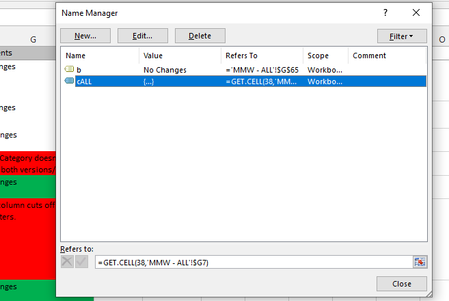
Hello, I am new to working in excel in a professional setting. I've been given a shared document and I've used the "Forumulas-->NameManger" functionality to create some handy forumlas to count c...
 Jun 25, 2020Sure! You can record / save / import the macros in your Personal! (.xlsb) file, which means they are available in the Excel app, rather than in a specific workbook.
https://support.microsoft.com/en-gb/office/copy-your-macros-to-a-personal-macro-workbook-aa439b90-f836-4381-97f0-6e4c3f5ee566
Charla74
Jun 24, 2020Iron Contributor
You will need to save as a macro enabled file (.XLSM) as a regular format (.XLSX) can not store / run macros. In the Save As dialogue box, just choose this format and it should be fine on reopening.
 SteveDatzJun 25, 2020Copper Contributor
Hey Charla74 ,
Thanks for the reply,
but as I tried mentioning, I dont have the authority to tell people to all stop working on the .xlsx and switch to my xlsm.
So im wondering if there is any work around, like if I can save those macro's locally on my machine and reapply them everytime i open the document?
- Charla74Jun 25, 2020Iron ContributorSure! You can record / save / import the macros in your Personal! (.xlsb) file, which means they are available in the Excel app, rather than in a specific workbook.
https://support.microsoft.com/en-gb/office/copy-your-macros-to-a-personal-macro-workbook-aa439b90-f836-4381-97f0-6e4c3f5ee566 SARAVANA4839Sep 16, 2022Copper Contributor
Thanks for the answer. Even I saved my file as .xlsm or .xlsb still after I open I am getting the formulated cell as blocked