Forum Discussion

Budman36
Jul 30, 2019Brass Contributor
Removing "#NUM!" Error
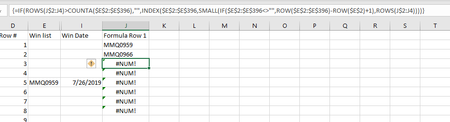
I don't understand what I am doing wrong. Can someone please help! Working on office 365, and making a table to consolidate data, and remove spaces. My formula works (as far as data), and I watche...

ConPellegrini
Jul 31, 2019Copper Contributor
I think that the problem is on your first argument of the IF function... It states that the formula should work only for the amount of rows that have data in it. It's a nice approach, but if the data you're looking at are not hardcoded data (if they come form formulas) the COUNTA function still counts the "empty" cells. So instead of stopping the formula where the cells are empty, he repeats it for as many rows as you have applied your other formulas to. Indeed, as Sergei Baklan said, it's better just to wrap it with and IFERROR.