Forum Discussion

Recreating a Twitter Search URL in Excel
- May 07, 2017
Hi Niels,
The most complex part of your task is to combine <from> part of the search string - we have to combine Twitter handle column in one string based on criteria are columns filtered or not.
Afraid the easiest way is to use VBA. I took one of samples found on Web https://www.mrexcel.com/forum/excel-questions/637445-concatenate-text-visible-cells.html
(Press Alt+F11 to open VBA environmen, copy/paste function code in new module)
Public Function ConcatenateVisible(rng As Variant, seperator As String)
    For Each cll In rng
        If cll.EntireRow.Hidden = False Then _
            ConcatenateVisible = ConcatenateVisible & cll.Value & seperator
    Next
    ConcatenateVisible = Left(ConcatenateVisible, Len(ConcatenateVisible) - Len(seperator))
End Function
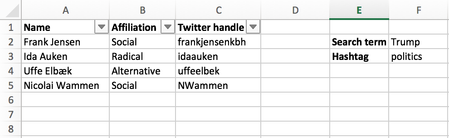
On your table above function
=ConcatenateVisible(C2:C5," OR from:")
returns result like
frankjensenkbh OR from:idaauken OR from:uffeelbek
After that the all what we need is to combine site URL and query string on it, e.g.
https://twitter.com/search?q=

to combine with

Radikale %23dkpol from:idaauken OR from:nielstybjerg OR from:loveyourleads
All parts for that we have now, resulting string use in HYPERLINK function
=HYPERLINK("https://twitter.com/search?q=" & F2 & " %23" & F3 & " from:"&ConcatenateVisible(C2:C5," OR from:"), "Search Twitter")which returns needed hyperlink.
File is attached - it is in macro-enabled format

Hi Niels,
The most complex part of your task is to combine <from> part of the search string - we have to combine Twitter handle column in one string based on criteria are columns filtered or not.
Afraid the easiest way is to use VBA. I took one of samples found on Web https://www.mrexcel.com/forum/excel-questions/637445-concatenate-text-visible-cells.html
(Press Alt+F11 to open VBA environmen, copy/paste function code in new module)
Public Function ConcatenateVisible(rng As Variant, seperator As String)
    For Each cll In rng
        If cll.EntireRow.Hidden = False Then _
            ConcatenateVisible = ConcatenateVisible & cll.Value & seperator
    Next
    ConcatenateVisible = Left(ConcatenateVisible, Len(ConcatenateVisible) - Len(seperator))
End Function
On your table above function
=ConcatenateVisible(C2:C5," OR from:")
returns result like
frankjensenkbh OR from:idaauken OR from:uffeelbek
After that the all what we need is to combine site URL and query string on it, e.g.
https://twitter.com/search?q=

to combine with

Radikale %23dkpol from:idaauken OR from:nielstybjerg OR from:loveyourleads
All parts for that we have now, resulting string use in HYPERLINK function
=HYPERLINK("https://twitter.com/search?q=" & F2 & " %23" & F3 & " from:"&ConcatenateVisible(C2:C5," OR from:"), "Search Twitter")which returns needed hyperlink.
File is attached - it is in macro-enabled format

Don't understand half of what you did there, but the attached file seems to be working perfectly! Thank you so much - you are a golden god! :-)