Forum Discussion

Recreating a Twitter Search URL in Excel
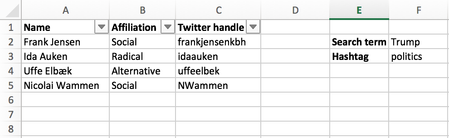
- May 07, 2017
Hi Niels,
The most complex part of your task is to combine <from> part of the search string - we have to combine Twitter handle column in one string based on criteria are columns filtered or not.
Afraid the easiest way is to use VBA. I took one of samples found on Web https://www.mrexcel.com/forum/excel-questions/637445-concatenate-text-visible-cells.html
(Press Alt+F11 to open VBA environmen, copy/paste function code in new module)
Public Function ConcatenateVisible(rng As Variant, seperator As String)
    For Each cll In rng
        If cll.EntireRow.Hidden = False Then _
            ConcatenateVisible = ConcatenateVisible & cll.Value & seperator
    Next
    ConcatenateVisible = Left(ConcatenateVisible, Len(ConcatenateVisible) - Len(seperator))
End Function
On your table above function
=ConcatenateVisible(C2:C5," OR from:")
returns result like
frankjensenkbh OR from:idaauken OR from:uffeelbek
After that the all what we need is to combine site URL and query string on it, e.g.
https://twitter.com/search?q=

to combine with

Radikale %23dkpol from:idaauken OR from:nielstybjerg OR from:loveyourleads
All parts for that we have now, resulting string use in HYPERLINK function
=HYPERLINK("https://twitter.com/search?q=" & F2 & " %23" & F3 & " from:"&ConcatenateVisible(C2:C5," OR from:"), "Search Twitter")which returns needed hyperlink.
File is attached - it is in macro-enabled format

Definitely use the concatenate function or the & sign.
You can do something like this:
=URLpart1&$F$2&URLpart2&$F$3&URLpart3&C2&URLpart4
With the concatenate functions it would be like this:
=concatenate(URLpart1,$F$2,URLpart2,$F$3,URLpart3,C2,URLpart4)
As far as filtering goes, it would be easy to fill in the first formula, drag the fill handle down to apply that formula to all rows, then filter as needed.

Zachary, latest part concatenates all invisible cells from column C, it looks like
" from:" & C2 & " OR from:" & C4 & " OR from:" & C5
assuming rows 2, 4 and 5 are visible.
If only row 4 is visible the part shall be
" from:" & C4
and so on
- Zachary GrotovskyMay 08, 2017Brass ContributorThanks for the comments, Sergei. I included absolute references and relative references based on the image included in Niels' example. Not sure what you mean by " from:" Can you please explain further?
- SergeiBaklanMay 08, 2017Diamond Contributor
Zachary,
Filtering is in task description, URL is generated based on list of filtered people.
As for the URL it has standard two parts - web address of the site and query to it.
Address of the search home page for twitter is
https://twetter.com/search
as for any query you add ?q= and after that search string. For example, for the URL
https://twitter.com/search?q=Radikale%20%23dkpol%20from:frankjensenkbh%20OR%20from:idaauken%20OR%20from:uffeelbek
search string if you re-write above html in more human friendly notation will be
Radikale #dkpol from:frankjensenkbh OR from:idaauken OR from:uffeelbek
which means you search Radikale with hashtag #dkpol and from accounts listed further.
All above is in the task description, actually search string could have more complex structure, you may see if check twitter advanced search.
- Zachary GrotovskyMay 08, 2017Brass ContributorGotcha, thanks for explaining, the %20 is a URL is a space