Forum Discussion

Recreating a Twitter Search URL in Excel
- May 07, 2017
Hi Niels,
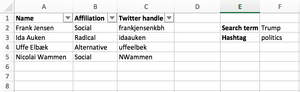
The most complex part of your task is to combine <from> part of the search string - we have to combine Twitter handle column in one string based on criteria are columns filtered or not.
Afraid the easiest way is to use VBA. I took one of samples found on Web https://www.mrexcel.com/forum/excel-questions/637445-concatenate-text-visible-cells.html
(Press Alt+F11 to open VBA environmen, copy/paste function code in new module)
Public Function ConcatenateVisible(rng As Variant, seperator As String)
    For Each cll In rng
        If cll.EntireRow.Hidden = False Then _
            ConcatenateVisible = ConcatenateVisible & cll.Value & seperator
    Next
    ConcatenateVisible = Left(ConcatenateVisible, Len(ConcatenateVisible) - Len(seperator))
End Function
On your table above function
=ConcatenateVisible(C2:C5," OR from:")
returns result like
frankjensenkbh OR from:idaauken OR from:uffeelbek
After that the all what we need is to combine site URL and query string on it, e.g.
https://twitter.com/search?q=

to combine with

Radikale %23dkpol from:idaauken OR from:nielstybjerg OR from:loveyourleads
All parts for that we have now, resulting string use in HYPERLINK function
=HYPERLINK("https://twitter.com/search?q=" & F2 & " %23" & F3 & " from:"&ConcatenateVisible(C2:C5," OR from:"), "Search Twitter")which returns needed hyperlink.
File is attached - it is in macro-enabled format

Yes, add to the cell
="https://twitter.com/search?q=" & F150 & " %23" & F151 & " from:" & ConcatenateVisible(C2:C148," OR from:")
and copy/paste result to browser. The only point i guess Twitter search string also has some limits on its length.

I'm terribly sorry, but could I ask you to attach the file and send it to me? When I try to set it up, I get an error to the formula. I think it messes up a bit because I'm in a Danish version of Excel, so everything is named differently...
I have to demo this tomorrow morning, so I would be grateful for any help I can get
- SergeiBaklanSep 14, 2017Diamond Contributor
Hi Niels,
I updated a file, please see attached.
First about twitter limit:
Within any regular search, a maximum limit of 500 characters can be allowed in a search string, after the string is URL encoded (for example a space will take up 3 characters when encoded as ‘%20’ in the URL).
see at Advanced Twitter search using query operators
Thus in any case you have to be in above limit.
To generate hyperlink directly this formula is used
=IFERROR(
   HYPERLINK("https://twitter.com/search?q=" & F150 & " %23" & F151 & " from:"& GetQueryString(C2, " OR from:"), "Search Twitter"),
   "The query is too long")
with updated macro which automatically calculates the size of your range
Public Function GetQueryString(rng As Variant, seperator As String)

   Dim nRows As Long, rSearch as Range
With ActiveSheet
   nRows = .Cells(.Rows.Count, "C").End(xlUp).Row
   For Each cll In .Range(rng, .Cells(nRows,"C"))
      If cll.EntireRow.Hidden = False Then _
         GetQueryString = GetQueryString & cll.Value & seperator
   Next
   GetQueryString = Left(GetQueryString, Len(GetQueryString) - Len(seperator))
End With
End Function
Here the query is to be less than 255 characters, that's the limitation of HYPERLINK function.
To expand it a bit another two macros are added. First generates the hyperling in the cell after you click the button on which the macro assigned, after that you may click on this link
Sub HyperlinInCell()

Dim i As Long, firstRow As Long, lastRow As Long
Dim sLinkName As String, sHyperlink As String, sSeparator As String

firstRow = 2        'Put first hyperlink on this row
sSeparator = " OR from:"
sHyperlink = "https://twitter.com/search?q=" & Range("F150") & " %23" & Range("F151") & " from:"
sLinkName = "Twitter Search"

With ActiveSheet
   lastRow = .Cells(.Rows.Count, "C").End(xlUp).Row
   .Cells(153, "E").Value = ""

   For i = firstRow To lastRow
      If .Cells(i, "C").EntireRow.Hidden = False Then _
         sHyperlink = sHyperlink + .Cells(i, "C").Value + sSeparator
   Next
   sHyperlink = Left(sHyperlink, Len(sHyperlink) - Len(sSeparator))

   .Cells(153, "E").Value = sHyperlink
   If Len(sHyperlink) < 1024 Then
      .Hyperlinks.Add anchor:=.Cells(153, "E"), _
      Address:=sHyperlink, _
      TextToDisplay:=sLinkName
   Else
      MsgBox ("The query string is too long")
   End If

End With
End Sub
Another macro opens your default browser if you click on related button (and adds search string in the cell to the right of button)
Sub OpenDefaultBrowser()

Dim i As Long, firstRow As Long, lastRow As Long
Dim sLinkName As String, sHyperlink As String, sSeparator As String

firstRow = 2
sSeparator = " OR from:"
sHyperlink = "https://twitter.com/search?q=" & Range("F150") & " %23" & Range("F151") & " from:"
sLinkName = "Twitter Search"

With ActiveSheet
   lastRow = .Cells(.Rows.Count, "C").End(xlUp).Row
   .Cells(155, "E").Value = ""

   For i = firstRow To lastRow
      If .Cells(i, "C").EntireRow.Hidden = False Then _
         sHyperlink = sHyperlink + .Cells(i, "C").Value + sSeparator
   Next
   sHyperlink = Left(sHyperlink, Len(sHyperlink) - Len(sSeparator))

   If Len(sHyperlink) < 1024 Then
      .Cells(155, "E").Value = sHyperlink
      ThisWorkbook.FollowHyperlink Address:=.Cells(155, "E").Value
   Else
      MsgBox ("The query string is too long")
   End If

End With
End Sub
It looks like this
Latest two have the limit 1024 characters for the URL generated
Please note i didn't polish the code and hardcoded all you locations within the Excel, you may improve that.
- Niels TybjergSep 17, 2017Copper Contributor
Hi Sergey
Sorry for not getting back to you on this one, but I've been off the grid for a few days.
I've done the first presentation of the Twitter tool, and it was a great success - the management really sees this both as a time saver doing research and as a business opportunity, so thank you so much for helping me shine!
Now I just have to fully understand the latest version you sent me :-) I'm already looking into expanding it with other search functionalities.
I'm really grateful for the time and the effort you put into helping me.
- SergeiBaklanSep 13, 2017Diamond Contributor
Here it is