Forum Discussion

Recreating a Twitter Search URL in Excel
- May 07, 2017
Hi Niels,
The most complex part of your task is to combine <from> part of the search string - we have to combine Twitter handle column in one string based on criteria are columns filtered or not.
Afraid the easiest way is to use VBA. I took one of samples found on Web https://www.mrexcel.com/forum/excel-questions/637445-concatenate-text-visible-cells.html
(Press Alt+F11 to open VBA environmen, copy/paste function code in new module)
Public Function ConcatenateVisible(rng As Variant, seperator As String)
    For Each cll In rng
        If cll.EntireRow.Hidden = False Then _
            ConcatenateVisible = ConcatenateVisible & cll.Value & seperator
    Next
    ConcatenateVisible = Left(ConcatenateVisible, Len(ConcatenateVisible) - Len(seperator))
End Function
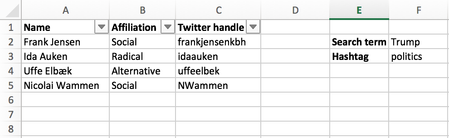
On your table above function
=ConcatenateVisible(C2:C5," OR from:")
returns result like
frankjensenkbh OR from:idaauken OR from:uffeelbek
After that the all what we need is to combine site URL and query string on it, e.g.
https://twitter.com/search?q=

to combine with

Radikale %23dkpol from:idaauken OR from:nielstybjerg OR from:loveyourleads
All parts for that we have now, resulting string use in HYPERLINK function
=HYPERLINK("https://twitter.com/search?q=" & F2 & " %23" & F3 & " from:"&ConcatenateVisible(C2:C5," OR from:"), "Search Twitter")which returns needed hyperlink.
File is attached - it is in macro-enabled format

Hi Niels,
The most complex part of your task is to combine <from> part of the search string - we have to combine Twitter handle column in one string based on criteria are columns filtered or not.
Afraid the easiest way is to use VBA. I took one of samples found on Web https://www.mrexcel.com/forum/excel-questions/637445-concatenate-text-visible-cells.html
(Press Alt+F11 to open VBA environmen, copy/paste function code in new module)
Public Function ConcatenateVisible(rng As Variant, seperator As String)
    For Each cll In rng
        If cll.EntireRow.Hidden = False Then _
            ConcatenateVisible = ConcatenateVisible & cll.Value & seperator
    Next
    ConcatenateVisible = Left(ConcatenateVisible, Len(ConcatenateVisible) - Len(seperator))
End Function
On your table above function
=ConcatenateVisible(C2:C5," OR from:")
returns result like
frankjensenkbh OR from:idaauken OR from:uffeelbek
After that the all what we need is to combine site URL and query string on it, e.g.
https://twitter.com/search?q=

to combine with

Radikale %23dkpol from:idaauken OR from:nielstybjerg OR from:loveyourleads
All parts for that we have now, resulting string use in HYPERLINK function
=HYPERLINK("https://twitter.com/search?q=" & F2 & " %23" & F3 & " from:"&ConcatenateVisible(C2:C5," OR from:"), "Search Twitter")which returns needed hyperlink.
File is attached - it is in macro-enabled format

Hi Sergei
You helped me long time ago with this, and it's been working perfectly with a small list. But when you go beyond 10 people on the list, the formula is broken...
Any chance I could get you to take a look at it? It's when I change the formula from =HYPERLINK("https://twitter.com/search?q=" & F150 & " %23" & F151 & " from:"&ConcatenateVisible(C2:C10;" OR from:"); "Search Twitter") to C2:C11 or higher...
- SergeiBaklanSep 12, 2017Diamond Contributor
Hi Niels,
I see. That's not an error in formula, HYPERLINK() function works with strings which have not more than 255 characters. As soon as formula generates more, the HYPERLINK returns error.
Okay, i'll try to find the workaround. Remember that issue discussed.
- Niels TybjergSep 12, 2017Tin Contributor
Okay - thought I had messed it up by trying to adjust it to include more rows.
A quick fix could be to remove the hyperlink function - then I would have to copy/paste the URL each time, which would be annoying, but at least it would be working - correct?
- SergeiBaklanSep 12, 2017Diamond Contributor
Yes, add to the cell
="https://twitter.com/search?q=" & F150 & " %23" & F151 & " from:" & ConcatenateVisible(C2:C148," OR from:")
and copy/paste result to browser. The only point i guess Twitter search string also has some limits on its length.