Forum Discussion

Federico Fontana
Sep 05, 2017Copper Contributor
Reading .csv stored in Azure Blob Storage from Excel
I've been able to create a storage account, then a container, than a blob storing a .csv file. I've successfully been able to download the .csv file from Azure itself and using Python as well via the...
- Sep 05, 2017
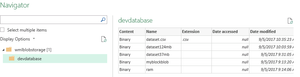
Hi, don't load the connection, edit the connection
then in the Power Query screen, filter the 'Name' column to get the files you want, then click on the column 'Content' to actual get the data.
Sorry my example sheets have only one column, but you can use the Power Query features to transform the files.


SergeiBaklan
Mar 20, 2021Diamond Contributor
Perhaps that Workaround to connect to Power BI dataflows from Power Query in Excel – (thebiccountant.com) could help

DesOwens
Mar 20, 2021Copper Contributor
Hi Sergei,
Unfortunately that appears way too difficult for my abilities, I don't think it will help me
Thanks
Des
Unfortunately that appears way too difficult for my abilities, I don't think it will help me
Thanks
Des
- SergeiBaklanMar 20, 2021Diamond Contributor
Sorry, I personally have no practical experience with that.
- DesOwensMar 20, 2021Copper ContributorThanks Sergei,
I have managed to download what I need as a JSON file and then use an online converter to change to a csv file which I can work with !!
So I'm happy enough, pity the Query would not work for me.
Thanks for your input
Des- SergeiBaklanMar 20, 2021Diamond Contributor
Great to know you sorted this out, thank you for the update