Forum Discussion

sum of two drop down lists
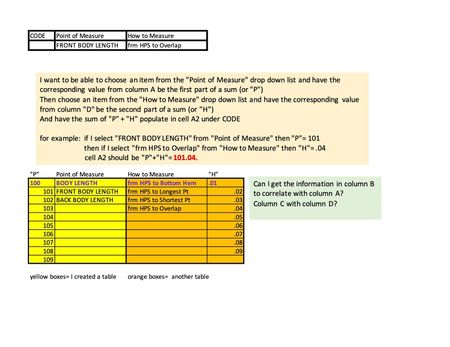
- May 09, 2023
Yes, that makes all the difference! XLOOKUP is only available in Microsoft 365 and Office 2021, not in Office 2019.
Try this formula instead:
=IF(B13="",0,INDEX(BL[BL'#],MATCH(B13,BL[BL DESCRIPTION],0)))+IF(C13="",0,INDEX(BLHTM[HTM'#],MATCH(C13,BLHTM[HTM DESCRIPTION],0)))
Workbook with this formula attached.

Could you attach a small sample workbook demonstrating the problem (without sensitive data), or if that is not possible, make it available through OneDrive, Google Drive, Dropbox or similar?

Yes, please see attached. Tabs/sheets are highlighted in green and red.
The data charts are in red "data set(DO NOT USE PRINT)" tab
The cells that I want to populate using formula are in green "GRADED SPEC" tab.
If there is anything else I can make clearer for you, pls let me know.
Again, thank you for your time!
- HansVogelaarMay 08, 2023MVP
Does this do what you want?
- feistybMay 08, 2023Copper ContributorUnfortunately, no.
I am not able to select other options in the drop down lists and have them sum correctly/without error.- HansVogelaarMay 08, 2023MVP
Which version of Excel do you have?