Forum Discussion

Brian Fergerson
Feb 27, 2017Copper Contributor
Excel Survey Option Missing from Excel Online
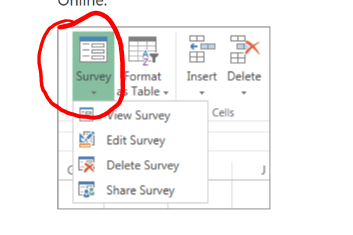
Some of our users have reported that they are no longer able to create Excel Surveys from within Excel Online. I've spot verified that the option does appear to be missing. I'm searching to see if th...

Azral_Mohd_Yacob
May 23, 2017Copper Contributor
Thanks Sergei, your guest is right. For those of you who do not see your Excel Survey option while editing your Excel Online, please approach your Office 365 Global Administrator and get him/her to make the following changes.
Global Administrator logins on to O365. Go to Admin Centers, click OneDrive, click Sharing.
Let users share SharePoint content with external user [On]
Users can share with:
Set this to: [Anyone, including anonymous users]
Let users share OneDrive content with external users [On]
Users can share with:
Set this to:[Anyone, including anonymous users]
Further down you can set your own Default sharing links
My case I set it to:
* Internal - only people in the organization
Anonymous access links:
Links expire within
[0] days
File permissions
[View and edit]
Folder permissions
[View, edit and upload]
What can external users do
I do not check for the following:
[ ]External users must accept sharing invitations using the same account that the invitations were sent to (* I do not check)
[ ]Let external users share items they don't own (* I do not check)
Click Save.
It solved for me and my colleagues. Excel Survey options reappeared again while editing Excel Online.
Good luck !!
Global Administrator logins on to O365. Go to Admin Centers, click OneDrive, click Sharing.
Let users share SharePoint content with external user [On]
Users can share with:
Set this to: [Anyone, including anonymous users]
Let users share OneDrive content with external users [On]
Users can share with:
Set this to:[Anyone, including anonymous users]
Further down you can set your own Default sharing links
My case I set it to:
* Internal - only people in the organization
Anonymous access links:
Links expire within
[0] days
File permissions
[View and edit]
Folder permissions
[View, edit and upload]
What can external users do
I do not check for the following:
[ ]External users must accept sharing invitations using the same account that the invitations were sent to (* I do not check)
[ ]Let external users share items they don't own (* I do not check)
Click Save.
It solved for me and my colleagues. Excel Survey options reappeared again while editing Excel Online.
Good luck !!

Clifford
May 25, 2017Copper Contributor
Our organization got same problem too, but your advise is such a big help. Issue was resolved.
Thank you.
John