Forum Discussion

questions aboaut excel functions
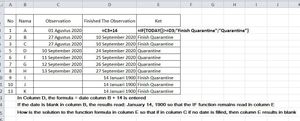

Change the formula in D3 to
=IF(C3="";"";C3+14)
and that in E3 to
=IF(C3="";"";IF(TODAY()>=D3;"Finish Quarantine";"Quarantine"))

thank you for your answer
One more questioncan it be used in excel condittional formatting.?
how is the formula?
thank you
- HansVogelaarSep 11, 2020MVP
A conditional formatting formula must return TRUE or FALSE. For example:
=AND($C3<>"",TODAY()>=$D3)
- Detlef_LewinSep 11, 2020Silver Contributor
A conditional formatting formula must return TRUE or FALSE. For example:Not quite.
In order to trigger the conditional formatting the formula must return TRUE or a number value not equal to 0.
If the formula returns text, an error value, 0 or FALSE the conditional formatting will not be triggered.
- taroda385Sep 12, 2020Copper Contributor
thanks for helping me solve this formula function problem
I have tried and succeeded in conditional formatting
- taroda385Sep 11, 2020Copper Contributor
- SergeiBaklanSep 12, 2020Diamond Contributor
It looks like two parallel discussions about the same, another one https://techcommunity.microsoft.com/t5/excel/excel-formula-questions/m-p/1659387

