Forum Discussion

Mikki Sørensen
May 11, 2018Copper Contributor
Problem to get correct sum of simple plus and minus
Hi I can not get excel to plus and minus correct. It gives me 0,000000000000113686837721616 -0,000000000000454747350886464 From same numbers What is worng?
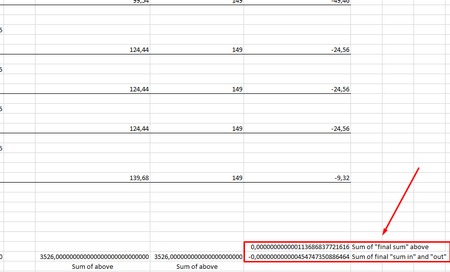
 May 14, 2018I'm pretty sure Mikki is user #752188140. Anyeay, in general, when you expect a calculation to be accurate to n decimal places, explicitly round to that number of decimal places. Do not round to an arbitrary number of decimal places like 10, as many people suggest. For example, if your formula is =SUM(A1:A100), change it to =ROUND(SUM(A1:A100);2) if want the sum to be accurate to 2 decimal places. FYI, the root cause of the problem is: more decimal fractions cannot be represented exactly in 64-bit binary floating-point, which is what Excel uses to represent numbers. For example, 124.44 is exactly 124.439999999999,99772626324556767940521240234375. (I use period for the decimal point and comma to demarcate the first 15 significant digits, which is all that Excel displays (rounded).
JoeUser2004
May 14, 2018Bronze Contributor
I'm pretty sure Mikki is user #752188140. Anyeay, in general, when you expect a calculation to be accurate to n decimal places, explicitly round to that number of decimal places. Do not round to an arbitrary number of decimal places like 10, as many people suggest. For example, if your formula is =SUM(A1:A100), change it to =ROUND(SUM(A1:A100);2) if want the sum to be accurate to 2 decimal places. FYI, the root cause of the problem is: more decimal fractions cannot be represented exactly in 64-bit binary floating-point, which is what Excel uses to represent numbers. For example, 124.44 is exactly 124.439999999999,99772626324556767940521240234375. (I use period for the decimal point and comma to demarcate the first 15 significant digits, which is all that Excel displays (rounded).
- JoeUser2004May 14, 2018Bronze Contributor
Sorry about the several typos. New to this particular forum. "Anyeay" should be "anyway". "More decimal fractions" should be "most decimal fraction". I deprecate the use of "precision as displayed" for many reasons. But if you want to experiment, be sure to save a backup copy of the Excel file first. PAD can change some constant values permanently.