Forum Discussion

Ovette Abejuela
Mar 23, 2018Copper Contributor
Power Query | Transformations via Folder Connector (manual)
Hi,
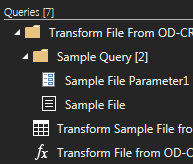
I was trying to understand how does this work:
So, I created the
1. Sample File first
2. then the Sample File Parameter1
3. Transform Sample File from Query1
4. the...


Ovette Abejuela
Mar 23, 2018Copper Contributor
Hi,
Whoeever is following this, just an update:
I was able to resolve this statement:
"...but if I add more steps to #3, it does not reflect in #4. And even if I manually copy all the step applied in #3 to #4 it does not reflect to the main query."
I did something wront with the Table.ExpandTableColumn line....
instead of using this:
#"Expand Data" = Table.ExpandTableColumn(#"Removed Other Columns", "Transform File from Query1", Table.ColumnNames(#"Transform File from Query1"(#"Sample File")))
I used something else, like
#"Expand Data" = Table.ExpandTableColumn(Source,"Data",{"Column1","Column2","Column3","AndSoOn"})
So only one problem now.... how to sync #3 to #4 every time I modify #3.