Forum Discussion

Ovette Abejuela
Mar 23, 2018Copper Contributor
Power Query | How to determine/remove this non-printable character
Hi,
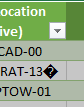
How do I remove this character as I already tried Transform > Clean but it didn't help:
In Power Query, it shows like this:
If loaded into Excel, it looks like this:
...
 Mar 23, 2018
Hello Ovette,
Instead of the Clean method, go to Any Column group in the same Transform tab, then select Replace Values, and then replace this character � with nothing.
Hope that helps
Haytham Amairah
Mar 23, 2018Silver Contributor
Hello Ovette,
Instead of the Clean method, go to Any Column group in the same Transform tab, then select Replace Values, and then replace this character � with nothing.
Hope that helps