Forum Discussion

Poly2021
May 31, 2021Copper Contributor
Power Query- Data Cleaning (Unpivot, Transpose,etc)
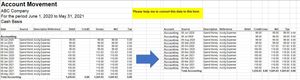
Hello Team, I was hoping you can help with my training in power query. Im practising how to clean and transform data in power query so that I can easily manipulate and analyze the data in excel. ...
- May 31, 2021
In Advance Editor add two lines to find positions of these texts and apply Table.Range to them like
let
    Source = Excel.CurrentWorkbook(){[Name="Range"]}[Content],
    Start = List.PositionOf(Source[Column1], "Accounting"),
    End =  List.PositionOf(Source[Column1], "Total Accounting"),
    #"Kept Range of Rows" = Table.Range(Source,Start+1,End-Start-1)

in
    #"Kept Range of Rows"

SergeiBaklan
May 31, 2021Diamond Contributor
In Advance Editor add two lines to find positions of these texts and apply Table.Range to them like
let
    Source = Excel.CurrentWorkbook(){[Name="Range"]}[Content],
    Start = List.PositionOf(Source[Column1], "Accounting"),
    End =  List.PositionOf(Source[Column1], "Total Accounting"),
    #"Kept Range of Rows" = Table.Range(Source,Start+1,End-Start-1)

in
    #"Kept Range of Rows"

Poly2021
May 31, 2021Copper Contributor
Great. Thank you so much