Forum Discussion

EmmaE2106
Mar 24, 2022Copper Contributor
PivotTable percentage column
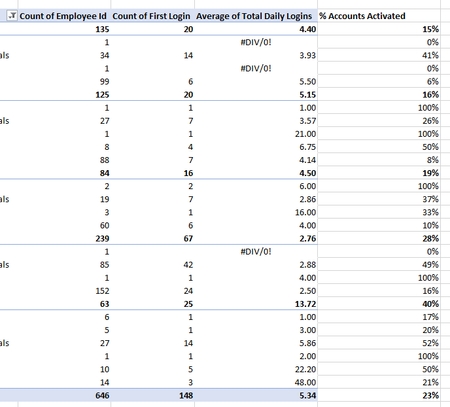
Hi All, I currently have the below PivotChart. Column E (% of accounts activated) I've manually entered a formula to calculate C (count of first login) as a percentage of B (count of Employee ID)...

EmmaE2106
Mar 27, 2022Copper Contributor
Riny_van_Eekelen no I'm after number of total logins as a percentage of number of people per area (not total number of people), so the first row would be 20 / 135 = 15%. The total row would be 148 / 646 = 23%

Riny_van_Eekelen
Mar 27, 2022Platinum Contributor
EmmaE2106 Sorry! I misunderstood. Forget about DAX measures. Just add a Calculated Field like in the picture below.
File attached!
- EmmaE2106Mar 29, 2022Copper ContributorThank you. I can't get this to work. Possibly because my "count of first login" is a count of, rather than a number field?
- Riny_van_EekelenMar 29, 2022Platinum Contributor
EmmaE2106 A count is also a number, so that shouldn't matter.
- EmmaE2106Mar 29, 2022Copper ContributorAll of the threads and how to pages I've seen say you can only use "sum" values for a Calculated Field and it won't work with "count of" values, I need to use PowerPivot and I'm absolutely lost. I've given up and will continue to manually calculate percentages using a formula in each row.