Forum Discussion

PivotTable percentage column
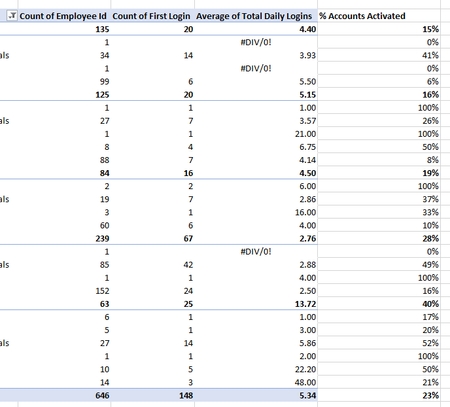

EmmaE2106 If I understood correctly, you want to express the number of first logins for each employee as a percentage of the total count of employees. So, for the row where is says 34 (empl count) and 14 (login) you would expect 2.17% (i.e. 14/646)? If so, you need to use Power Pivot and add some DAX measures. The picture below is just a mock-up of something similar to your pivot table. I have attached the file for reference. DAX measures are not really all that easy to grasp and they are a bit outside my comfort zone, but with some Googling one can get quite far.
 EmmaE2106Mar 27, 2022Copper Contributor
Riny_van_Eekelen no I'm after number of total logins as a percentage of number of people per area (not total number of people), so the first row would be 20 / 135 = 15%. The total row would be 148 / 646 = 23%
- Riny_van_EekelenMar 27, 2022Platinum Contributor
EmmaE2106 Sorry! I misunderstood. Forget about DAX measures. Just add a Calculated Field like in the picture below.
File attached!
- EmmaE2106Mar 29, 2022Copper ContributorThank you. I can't get this to work. Possibly because my "count of first login" is a count of, rather than a number field?