Forum Discussion

Pivot table shaow parentage as grand subtotal
- Mar 10, 2018
Hi Haitham,
I see, sorry for misunderstanding.
If creating pivot table you added your data to data model (usually default option) I'd add couple of measure (in PivotTable fields window right click on table name) like
PercentYes:=CALCULATE(SUM(MyTable[value]),MyTable[answers]="yes")/CALCULATE(SUM(MyTable[value]),ALL(MyTable[subcategory],MyTable[answers]))
similar for "no", and show them instead of number of yes and no. Not to forget to apply % format to the measure on creating.
Not sure about your field names.

Hi,
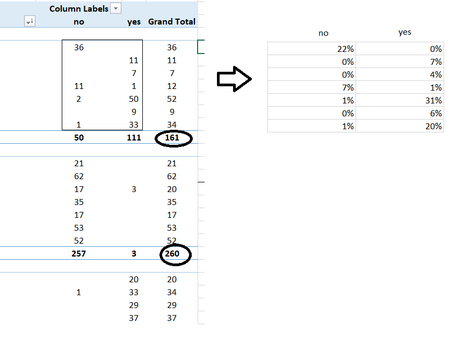
I guess that's show as % of Parent Row Total in value field settings

Unfortunately, % of Parent Row Total it gets the value and divided by the total number in the same column. like in my example: 36 / 50
- SergeiBaklanMar 10, 2018Diamond Contributor
Hi Haitham,
I see, sorry for misunderstanding.
If creating pivot table you added your data to data model (usually default option) I'd add couple of measure (in PivotTable fields window right click on table name) like
PercentYes:=CALCULATE(SUM(MyTable[value]),MyTable[answers]="yes")/CALCULATE(SUM(MyTable[value]),ALL(MyTable[subcategory],MyTable[answers]))
similar for "no", and show them instead of number of yes and no. Not to forget to apply % format to the measure on creating.
Not sure about your field names.
- Haitham DarweeshMar 10, 2018Copper Contributorthanks so much Mr. Sergei Baklan