Forum Discussion

Normalize two different scales on waterfall graph
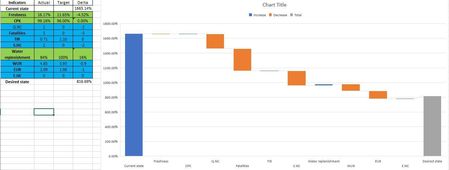

Hey Diego André Sáenz Peña-
You can create a few Named Ranges and add in a worksheet event to help with the chart. The short snippet of code will need to be pasted in the "Chart" worksheet module:
Private Sub Worksheet_Change(ByVal Target As Range)
    If Not Intersect(Target, Range("rngWaterFallMin")) Is Nothing Then
        Me.ChartObjects("chtWaterFall").Chart.Axes(xlValue).MinimumScale = Target.Value
    End If
End Sub
1. Create a named range cell to control the minimum axis (Note: this could be a formula....)
2. Name the range "rngWaterFallMin"
3. Select the chart
4. Name the chart "chtWaterFall"
5. Now when you change the value of the "rngWaterFallMin" cell the value will automatically update the chart. Changing it to make the bars appear larger or smaller based on your new specified minimum value.
You can try this in the example file. Since I cannot post an .xlsm file due to security risks you will have to add the code snippet to the attached file as specified in the instructions....