Forum Discussion

Bailey317
Dec 20, 2021Copper Contributor
Nested EDATE Function
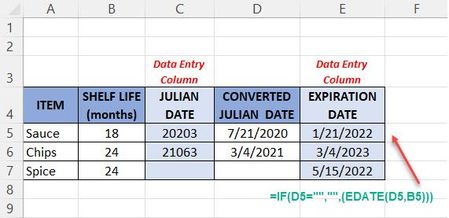
Excel Microsoft 365/Windows 10/Laptop I am having trouble figuring out how to write the formula using a nested EDATE function. I am creating a spreadsheet of food expirations and some of the prod...
 Dec 20, 2021
=IF(C5="", "",
EDATE(DATE(IF(--LEFT(C5,2)<30, 2000, 1900)+LEFT(C5,2), 1, RIGHT(C5,3)), B5))
If C5 might contain only 4 digits for dates less than 2010, replace C5 with TEXT(C5,"00000") .
I don't know how you calculated E7.
JoeUser2004
Dec 20, 2021Bronze Contributor
=IF(C5="", "",
EDATE(DATE(IF(--LEFT(C5,2)<30, 2000, 1900)+LEFT(C5,2), 1, RIGHT(C5,3)), B5))
If C5 might contain only 4 digits for dates less than 2010, replace C5 with TEXT(C5,"00000") .
I don't know how you calculated E7.

Bailey317
Dec 20, 2021Copper Contributor
Thank you JoeUser2004. You are awesome! That worked. I was getting myself so confused on how to nest that EDATE. I really appreciate you taking the time to help me with that.