Forum Discussion

Charles130123
Jan 13, 2023Copper Contributor
Import Wizard to update fields in existing project
I am using the Import Wizard to update two fields in my existing project using the Unique ID as a key. The two fields are both Textxx fields. When I import, I get for every task and it either...

Charles130123
Jan 15, 2023Copper Contributor
Yes, but I will have to redact most of the material. Let me see if I can reduce the example to something I can share which isn't Official Sensitive. I am sure this is something I am doing different and that exercise might expose what it is ...
Charles
Charles

John-project
Jan 15, 2023Silver Contributor
Charles,
No problem, I fully understand your need to protect sensitive information. I can send you a macro that will remove all sensitive information from your Project file. It reduces the file to a generic structure. Let me know if you want it. I don't have anything for Excel files, you'll have to desensitize it yourself.
Once you have something to send, send it to me at the address below. Note, I need both your Project and Excel files.
John
jmacprojataticlouddotdotcom
(remove obvious redundancies
No problem, I fully understand your need to protect sensitive information. I can send you a macro that will remove all sensitive information from your Project file. It reduces the file to a generic structure. Let me know if you want it. I don't have anything for Excel files, you'll have to desensitize it yourself.
Once you have something to send, send it to me at the address below. Note, I need both your Project and Excel files.
John
jmacprojataticlouddotdotcom
(remove obvious redundancies
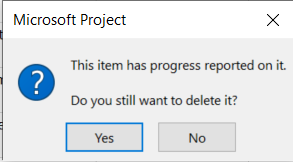
- Charles130123Jan 24, 2023Copper ContributorThe behaviour is bizarre in the extreme. I have reduced the project to one task and the import to update the Text fields to one line. If the task is AutoScheduled before the Import starts, I get the "Delete Progress" message and whatever I answer, the progress is deleted, the Duration zeroed and the Complete set to 100%. The task is also set to Manually Scheduled!
If the Task is Manually Scheduled before I start, the update takes place successfully with no other alterations. This must be a defect ..... surely?
Charles- John-projectJan 24, 2023Silver ContributorCharles130123,
No, not a defect.....at least not with Project or Excel.
Indeed the behavior you describe is very strange. You indicate the issue occurs on your "live" file that you have reduced to a single task. How does your import scenario work with a new test file? I'm guessing it will work fine. If a test file work fine, that suggests to me that perhaps your Project file is corrupt. Try this.
1. Save your Project file as XML.
2. Close Project and then re-open.
3. Open the XML file in Project
4. Now try the import
Does it work? I suspect it will work fine which indicates your original Project file was corrupt. If it still does not work, I suspect there is an issue with your Excel file. But again, I can't help with troubleshoot unless I can actually look at your Project and Excel files (desensitized as necessary).
John- Charles130123Jan 24, 2023Copper ContributorThe behaviour I report is for the importing one line in the Excel Import file to one task in the MS Project file. But ... I didn't start the MS Project file fresh - I cut down my live file. I will try two things:
a) as you suggest export the MS Project one liner to a external format and re-read, and
b) create an MS Project from scratch
and revert
Charles
Charles