Forum Discussion

heathermarie923
Sep 13, 2022Copper Contributor
Need help with VBA code to clear content of a range of cells based on today's date.
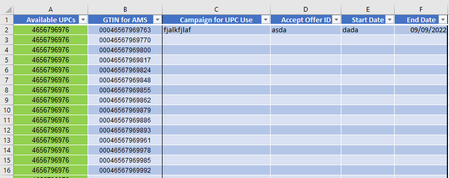
Good morning, I am looking for help to formulate VBA Code. I need to clear the contents of Columns C:F if Column F is less than today's date. Can anyone help me with this? Please and than...
 Sep 13, 2022
Without clicking the button?
Private Sub Worksheet_Activate()
Dim i As Long

For i = 2 To 1000

If Cells(i, 6) < Date Then
Range(Cells(i, 3), Cells(i, 6)).Clear
Else
End If

Next i
End Sub
Maybe with the Worksheet_Activate event.
After opening the attached file the sheet "Tabelle1" is shown with all the data. If you select "Tabelle3" and then again activate "Tabelle1" the Worksheet_Activate event is executed.
OliverScheurich
Sep 13, 2022Gold Contributor
Sub clear_C_to_F()

Dim i As Long

For i = 2 To 1000

If Cells(i, 6) < Date Then
Range(Cells(i, 3), Cells(i, 6)).Clear
Else
End If

Next i

End Sub
Maybe with these lines of code. In the attached file you can click the button in cell H2 to run the macro.

heathermarie923
Sep 13, 2022Copper Contributor
This is great! Is there anyway to automate the process when the spreadsheet is opened?
- OliverScheurichSep 13, 2022Gold Contributor
Without clicking the button?
Private Sub Worksheet_Activate()
Dim i As Long

For i = 2 To 1000

If Cells(i, 6) < Date Then
Range(Cells(i, 3), Cells(i, 6)).Clear
Else
End If

Next i
End Sub
Maybe with the Worksheet_Activate event.
After opening the attached file the sheet "Tabelle1" is shown with all the data. If you select "Tabelle3" and then again activate "Tabelle1" the Worksheet_Activate event is executed.
- heathermarie923Sep 13, 2022Copper ContributorIt didn't work for me, but my brain woke up a little bit. I was able to add to your code above and now it works. Thank you so much for helping me on this morning that my brain just couldn't think in code!!! I appreciate you!