Forum Discussion

Anonymous
Jun 07, 2023Need help with CONCAT Function
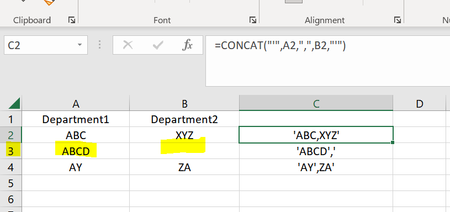
Hi All, Need help here with CONCAT Function, as I need to concat column A and B and get values as am getting for Rows 2 and 4 but for cases like in Row 3 where I have blank results, then I ...

NikolinoDE
Jun 07, 2023Platinum Contributor
=CONCAT(A2,B2)
Assuming that cell A2 contains "ABC" and cell B2 contains "XYZ", this formula will return "ABCXYZ" in cell C2.
If you want to concatenate columns A and B without a comma and display only the value from column A when column B is empty, you can use an IF function in combination with the CONCATENATE function. Here's the modified formula:
=IF(B2="", A2, CONCATENATE(A2, B2))
Note that the CONCATENATE function can also be replaced with the ampersand (&) operator for concatenation, like this:
=IF(B2="", A2, A2&B2)
Both formulas will achieve the same result.