Forum Discussion

Jeff_Hunt
Aug 15, 2023Copper Contributor
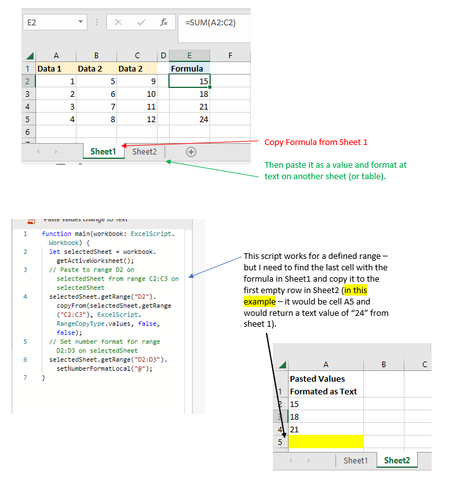
Need a script to find the last cell-copy, paste as value, then format as text on another sheet.
Here is a greatly simplified version of a script I am trying to run: In this example I have it going to a single column sheet that will work fine. It may work better (I need this for a Pow...
- Aug 16, 2023
Perhaps like
function main(workbook: ExcelScript.Workbook) {

 const value =
  workbook
    .getWorksheet("Sheet1")
    .getUsedRange()
    .getLastCell()
    .getValue()
    .toString()

  const targetCell =
    workbook
      .getWorksheet("Sheet2")
      .getUsedRange()
      .getLastCell()
      .getOffsetRange(1, 0)

  targetCell
    .setNumberFormats([["@"]])

  targetCell
    .setValue(value)


}

SergeiBaklan
Aug 16, 2023Diamond Contributor
If to copy the range that could be
function main(workbook: ExcelScript.Workbook) {

    const values = workbook
        .getWorksheet("Sheet1")
        .getUsedRange()
        .getLastColumn()
        .getValues()
        .slice(1)
        .map(x => Array.of(x[0].toString()))

    const cells = values.length

    workbook
        .getWorksheet("Sheet2")
        .getRange("A1")
        .getOffsetRange(1,0)
        .getResizedRange(cells-1,0)
        .setValues(values)

}