Forum Discussion

Need a function help please
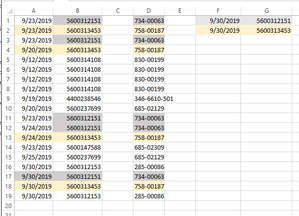


- mathetesNov 21, 2019Gold Contributor
Pingger I haven't been able to wrap my head around this totally yet. Here's a partial solution, but I'm pretty sure it's not what you want. It's not clear to me how you'd be using this....what I've created WILL find the latest date associated with any given combination in columns B and D, and I see that as a start.
What I've not been able to do--and Power Query might, but I've not had a need for that in the past, so someone else will have to provide that--is find the latest date for each of the combos; I could, but with a very elaborate set of criteria ranges that just paralleled your raw data, and I don't think that's what you want--
Another thing that's not clear: will a given Part # in column B always be associated with the same number in Column D? i.e., are they really two different ways to refer to the same thing? Or will there be instances where 5600314108 can be associated with 830-00199, but another time with 346-6610-501. If they're always the same pairing, just that some of them appear (as you've highlighted) multiple times, which is why you want the latest date for THOSE...that becomes a simpler matter. In fact, I've also created a query that works from a concatenated data element, made up of the two parts you specified.
Again, this is at most a start. If what you're looking for is a single function that will produce a list of all of the combinations, but only one instance of any that repeat, and the latest dates associated with each of those......then I think you need Power Query or some function I haven't mastered yet.
- PinggerNov 21, 2019Copper ContributorYour first assumption is right. Let me look at your solution suggestion. It is as simple as that. .
- SergeiBaklanNov 21, 2019Diamond Contributor
If with Power Query that is like
- query named range
- select Part and Other columns, Keep Duplicates (records without duplication will be removed)
- sort Date in descending order
- select Part and Other columns, Remove Duplicates (only first of each duplicate will be kept)
- load result back into Excel sheet
For reliability I'd fix sort result in memory by Table.Buffer() or by adding Index column (remove it at the end).
Above is for all duplicates. If we consider only records with 5 or more duplicates few more steps shall be added. Like Group by Part and Other counting combinations, remove records with less than 5 duplicates, merge source table with grouping result.
Result is second sheet attached.
