Forum Discussion

BRWNewc
May 04, 2024Copper Contributor
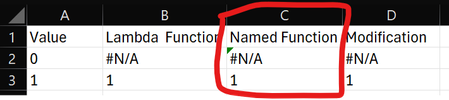
Named Lambda Function Error Bug?
I am not sure if this is a bug, but it seems odd to me. Lets says you want to create a Lambda function which outputs "#N/A" under a certain condition by using the NA() function, i.e.: =Lambda(inp...

PeterBartholomew1
May 04, 2024Silver Contributor
It may be that the test for flagging #N/A as an error or the intended result of a formula may be completely superficial; if NA() appears in the formula, then it is assumed the user means it!
TestNAλ
= LAMBDA([dummy], NA())

//"Worksheet formulae"
These are indicated as being errors
= TestNAλ("?")
= TestNAλ()
whilst this is not
= TestNAλ(NA())
In no case does the 'function' actually use the parameter.
- SergeiBaklanMay 04, 2024Diamond Contributor
That's actually second formula (with workaround) from BRWNewc .
Looks like #N/A is handled bit differently from other error, Moreover, if we type in cell =NA() (or simply #N/A which is equivalent of =NA() ) it doesn't give error mark as any other error (e.g. =1/0).
I may only guess what is the logic behind. In any case we can't correct it, only take as it is.
