Forum Discussion

James818
Jul 31, 2024Brass Contributor
My Excel macro works differently at work than home.
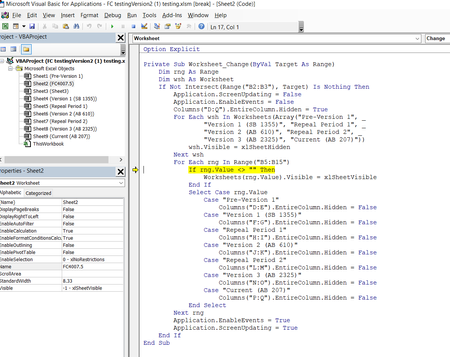
Hello everyone. I have a Excel macro that seems to work perfect at home however at my work PC I get a run time error 13. When I look at the VBA it highlights an error with my: rng/Value .... ...

HansVogelaar
Jul 31, 2024MVP
I see that the FILTER formulas return #NAME! in the second screenshot.
The FILTER function is only available in Excel in Microsoft 365 and Office 2021. Which version do you use at work?

James818
Jul 31, 2024Brass Contributor
Office 365 Plus at work.
- HansVogelaarJul 31, 2024MVP
Office 365 might be too old for the FILTER function.
- James818Jul 31, 2024Brass ContributorDo you have any recommendation based on my objective to at least enter a start and end date to provide the variables that apply that I can use on Office 365?
- HansVogelaarJul 31, 2024MVP
In B5 as an array formula confirmed by pressing Ctrl+Shift+Enter:
=IFERROR(INDEX(Sheet3!$A$2:$A$8, SMALL(IF((Sheet3!$B$2:$B$8<=IF($B$3="", $B$2, $B$3))*(Sheet3!$C$2:$C$8>=$B$2), ROW(Sheet3!$B$2:$B$8)-ROW(Sheet3!$B$2)+1), ROW($B5)-ROW($B$5)+1)), "")
Select B5 and copy it.
Select B6:B11 and paste as Formulas.