Forum Discussion

Mutiplying values based on criteria
- Dec 05, 2024
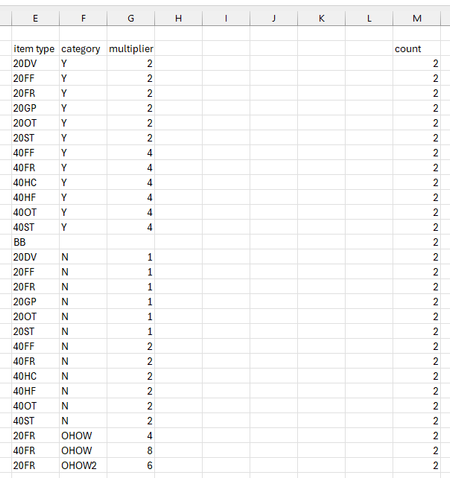
so there are few ways and assuming you don't need any particular exceptions for having combinations that don't exist or have multiple options your could use FILTER. I will use [ ] to indicate the related cells on that sheet and LU[ ] to indicate the LookUp table values so something like:
=[# cont] * FILTER( LU[multiplier], (LU[type]=[Cont type])*(LU[category]=[ODG]), 0)but that said I like where Peter was going with using a formula to calculate the multiplier instead of a lookup. Based on the pattern I see I might say:
=LET(
    TypeFactor, IFERROR( LEFT( [Cont type], 1) / 2 , 0),
    CatFactor, SWITCH( [ODG], "Y", 2 , "N", 1 , "OHOW", 4, "OHOW2", 6 , 0),
    [# cont] * TypeFactor * CatFactor
    )

Apologies for not being more specific. My spreadsheet looks like this:
Right now, depending on the values in column G and H, I would need to multiply values in column I accordingly to get the corresponding values in column J.
I would like to find a way to automate this, using the criterias that I provided in my original post (columns E-G). I would most likely put the criterias in these 3 columns in a separate sheet.
Hope this further clarifies the assistance I require?

so there are few ways and assuming you don't need any particular exceptions for having combinations that don't exist or have multiple options your could use FILTER. I will use [ ] to indicate the related cells on that sheet and LU[ ] to indicate the LookUp table values so something like:
=[# cont] * FILTER( LU[multiplier], (LU[type]=[Cont type])*(LU[category]=[ODG]), 0)but that said I like where Peter was going with using a formula to calculate the multiplier instead of a lookup. Based on the pattern I see I might say:
=LET(
    TypeFactor, IFERROR( LEFT( [Cont type], 1) / 2 , 0),
    CatFactor, SWITCH( [ODG], "Y", 2 , "N", 1 , "OHOW", 4, "OHOW2", 6 , 0),
    [# cont] * TypeFactor * CatFactor
    )
- jhcjDec 05, 2024Copper Contributor
Thank you both! The formula worked :)