Forum Discussion

Multiple values in each cell
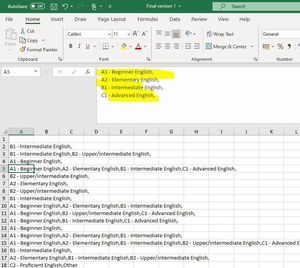

Even if I think that a picture is worth a thousand words, it is unfortunately not true in the case of Excel.
It would be advantageous if you insert a file (without sensitive data), so you could get an answer much faster.
So you help those who want to help, don't need to guess where it should count and how you want it to end.
A win-win situation for everyone ... if a file is included.
So simply read from the picture this formula could help you, as I said it is a guess.
=COUNTIF(select area, "A1") etc.
Nikolino
I know that I don't know (Socrates)
 Jenniferg980Aug 21, 2020Copper Contributor
NikolinoDEThanks for your reply.
I have attached a file below.
I think it is only counting the first value in each cell and not all of them?
- NikolinoDEAug 21, 2020Platinum Contributor
FREQUENCY function
Excel for Microsoft 365 Excel for Microsoft 365 for Mac Excel for the web Excel 2019The table is pivoted, so I can't help you because my knowledge about it is very poor (to put it mildly). A specialist like Mr Baklan has to work here to provide a quick and efficient solution :-).Sorry that I took your time and couldn't give you a quick solution.
Wish you a nice day.
Nikolino
I know I don't know anything (Socrates)