Forum Discussion

Multiple #DIV/0! and #VALUE! errors.
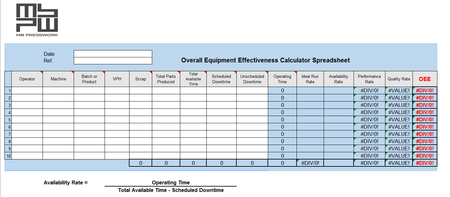
- Jan 23, 2018
I'm just looking at the spreadsheet.
M7 has a formula that will return a number or an empty string. Your formula only checks for M7=0 and an empty string "" is not equal to 0.
You have the IF thing down pat, but you need to apply the correct conditions.
I don't think wrapping everything into IfError is the best approach, since it will mask all errors and you won't know if something is really wrong in the spreadsheet. Error messages are helpful to find bugs.
Change the formula in O7 to check for a "" instead of a 0:
=IF(M7="","",(H7/L7)/M7)
In P7, I think you are not closing the brackets correctly:
=IF(H7=0,"",(H7-G7))/H7
I think what you really want is
=IF(H7=0,"",(H7-G7)/H7)
You can avoid the error of the Average formulas in row 17 by wrapping it in an IF that checks if the cells above have numbers, like
=IF(COUNT(M7:M16),AVERAGE(M7:M16),0)
If you don't want to show the zero, you can format it away with custom format.
File attached.


John,
It's easy and simple!
Just surround all that formulas with https://support.office.com/en-us/article/IFERROR-function-c526fd07-caeb-47b8-8bb6-63f3e417f611
See how it works in the attachment file.