Forum Discussion

Moving Average Treadline
- Nov 18, 2021
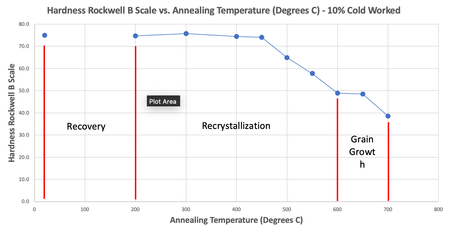
The problem is that you have created a line chart on data containing merged cells. The first data point is in D5, the next in D8 and so on. Hence, the line chart uses 75, blank, blank, 74.7 and so on. The line is formatted to show zeros and blanks as gaps, but with markers. Therefore, the dots are not connected. The trend line (2 period moving average) follows the dots from the regular line exactly because of the gaps in the data, but the first period will be blank, since you can't plot a 2 period average until after the second data point.
The picture below shows what I believe your data and basic chart should look like:
The blue line represents all data points and the red dotted line is the 2 period moving average. Get rid of the merged cells. They only cause trouble. I rarely use them myself. And when I do, it's in the last stage of a report for cosmetic reasons only. But never inside a data set that is subject to further analysis.

andrew1785 The line in your chart doesn't look like a trend-line. It looks more like a regular line chart where the values between the first and the second marker are blank and the series settings are to "show hidden or empty cells as gaps". But I may be mistaken. If you could upload the file that would be helpful.

Riny_van_Eekelen thanks for the response. Let me know if you can figure out why it's doing that. Just a note that I'm using the average readings in the table. Cheers.
- Riny_van_EekelenNov 18, 2021Platinum Contributor
The problem is that you have created a line chart on data containing merged cells. The first data point is in D5, the next in D8 and so on. Hence, the line chart uses 75, blank, blank, 74.7 and so on. The line is formatted to show zeros and blanks as gaps, but with markers. Therefore, the dots are not connected. The trend line (2 period moving average) follows the dots from the regular line exactly because of the gaps in the data, but the first period will be blank, since you can't plot a 2 period average until after the second data point.
The picture below shows what I believe your data and basic chart should look like:
The blue line represents all data points and the red dotted line is the 2 period moving average. Get rid of the merged cells. They only cause trouble. I rarely use them myself. And when I do, it's in the last stage of a report for cosmetic reasons only. But never inside a data set that is subject to further analysis.
- andrew1785Nov 19, 2021Copper ContributorRiny_van_Eekelen thank you very much for your help!