Forum Discussion

David1405
Nov 02, 2021Copper Contributor
Merging Cells in Multiple Columns with a Macro
Hello, I'm trying to create a macro where it merges the same amount of cells from the same rows on 4 different columns next to each other. In the example below, when I select and merge A1...
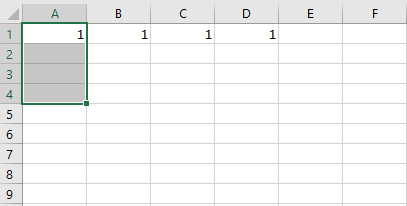

Riny_van_Eekelen
Nov 03, 2021Platinum Contributor
David1405 Try this one:
Sub Macro1()

ro = Selection.Rows.Count
acr = ActiveCell.Row
acc = ActiveCell.Column

For i = 0 To 3

    Range(Cells(acr, acc + i), Cells(acr + ro, acc + i)).Select

    With Selection
        .HorizontalAlignment = xlCenter
        .VerticalAlignment = xlBottom
        .WrapText = False
        .Orientation = 0
        .AddIndent = False
        .IndentLevel = 0
        .ShrinkToFit = False
        .ReadingOrder = xlContext
        .MergeCells = False
    End With
    Selection.Merge
    With Selection
        .HorizontalAlignment = xlCenter
        .VerticalAlignment = xlCenter
        .WrapText = False
        .Orientation = 0
        .AddIndent = False
        .IndentLevel = 0
        .ShrinkToFit = False
        .ReadingOrder = xlContext
        .MergeCells = True
    End With
  Next

  End Sub