Forum Discussion

logical function
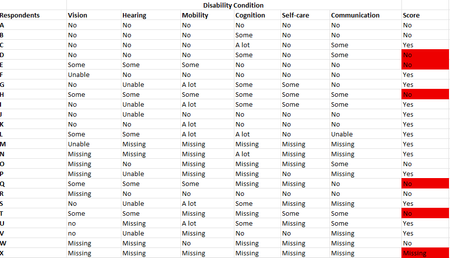

Depends on some of those definitions but it appears and 'A lot' or 'Unable' results in YES and the rest are ignored except if all the values are 'Missing' then return 'Missing'. Here is my solution:
=IFERROR(IF(AVERAGE(XLOOKUP(UPPER(B3:G3),UPPER($K$2:$K$6),$L$2:$L$6)),"Yes","No"),"Missing")

Thank you very much for your response. Actually, I want a formula that get me the same values in the score column. Those values in the score column are constant base on the respondent response under each of the disability domains.
- m_tarlerJul 15, 2025Silver Contributor
I don't understand. The formula I gave takes the responses from the 6 disability domains and produces the Yes/No 'Score' and in every case in your table my formula produced the SAME Score as you had listed. Your Score in column H and my formula in column I. I thought I attached the sample file but I will try again here.
If you feel my formula is not accurate, please let me know why or what other considerations are needed. I can only go on the information you provide.
- cnoah92Jul 16, 2025Copper Contributor
This work perfectly! I appreciate this very much. My concern is the All answers and count in the K and L cell. is it that anytime in the future I want to build this form I should also do same as in K and L or there is any other way of not referencing K and L but still get the required result?
- m_tarlerJul 16, 2025Silver Contributor
You can 'hard code' those values into the formula, or you could create a 'name' variable with them instead. Here it is 'hard coded':
=IFERROR(IF(AVERAGE(XLOOKUP(UPPER(B3:G3),{"NO","SOME","A LOT","UNABLE","MISSING"},{0,0,1,1,"M"})),"Yes","No"),"Missing")