Forum Discussion

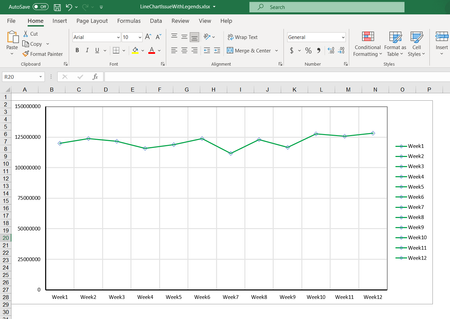
Line chart legends issue for single series

Click anywhere in the chart.
On the Chart Design tab of the ribbon, click Select Data.
The dialog should look like this:
If you click Edit under Legend Entries (Series), it should look similar to this:
And if you click Edit under Horizontal (Category) Axis Labels:
You should then get:

Hi HansVogelaar
I did the same whatever you have mentioned.
Still I'm seeing the legends as Week1 Test to Week12 Test instead of Test
Legend entry series :
Category axis labels :
So, could you please help me further! Thanks in advance!
Thanks,
Thilak Babu
- HansVogelaarJul 28, 2022MVP
Try creating the chart again from scratch:
- Select the source range as shown in your first post.
- Insert a line chart.
If I do that, I get the correct chart. The only things that need to be changed are the minimum, maximum and major unit of the y-axis.
- ThilakBabuJul 28, 2022Copper Contributor
Hi HansVogelaar ,
We created the excel programmatically.
The use case is to show only one legend. So trying to understand how I can change the same excel to achieve it . Please let me know if I can share the excel in case you need to take a look.
Thanks,
Thilak Babu
- HansVogelaarJul 28, 2022MVP
Yes, please attach or share the workbook.