Forum Discussion

Dan Kish
Mar 08, 2018Copper Contributor
LEFT formula based on adjacent cell text and pertaining value
Hi,
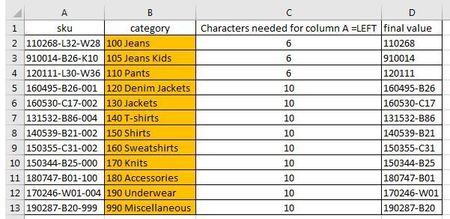
i have a report which consists of thousands of entries in column A and B only (column C and D do not exist in the report).
The example below shows all the categories in Column B within th...
 Mar 08, 2018
Dan,
I've understood from your explanation that you want to extract from column A a text with a set of characters based on a category:
- 6 characters with the categories: 100 Jeans, 105 Jeans Kids, 110 Pants.
- 10 characters with the others.
If so, you don't have to create a helper column (column c), you can identify the set of characters inside the formula in cell D2 as follows:
=LEFT(A2,IF(OR(B2="100 Jeans",B2="105 Jeans Kids",B2="110 Pants"),6,10))
Hope that helps.
Dan Kish
Mar 09, 2018Copper Contributor
Thanks Jamil,
this worked for me also - thanks for your time - appreciated.
Dan
this worked for me also - thanks for your time - appreciated.
Dan

Jamil
Mar 10, 2018Bronze Contributor
You are welcome.
you can further simplify Haytham's formula to this. so instead of 3 B2 references you can just have one.
=LEFT(A2,IF(OR(B2={"100 Jeans","105 Jeans Kids","110 Pants"}),6,10))
you can further simplify Haytham's formula to this. so instead of 3 B2 references you can just have one.
=LEFT(A2,IF(OR(B2={"100 Jeans","105 Jeans Kids","110 Pants"}),6,10))