Forum Discussion

amit_bhola
Jul 23, 2021Iron Contributor
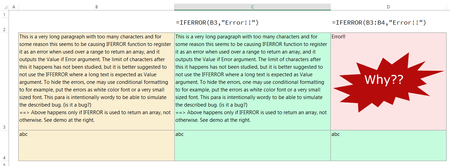
IFERROR reads a long text as Error when Input is a Range
For some reason, IFERROR function seems to be reading (registering) a long text as an Error when the input is a range of cells. It works fine if the input is a single cell. I don't know if it is due ...

Sergey_Lyakh
Jul 03, 2024Brass Contributor
amit_bhola
Love SergeiBaklan's response - simple fix!
I did find a way to keep the entire text though: instead of IFERROR, use ISERROR:
Change this:
IFERROR(B3:B4,"Error!!")To this:
IF(NOT(ISERROR(B3:B4)),B3:B4,"Error!!")TIP: If your range is more complicated than that, to avoid entering it twice, you can encapsulate it like this:
LET(MyRange,B3:B4,IF(NOT(ISERROR(MyRange)),MyRange,"Error!!")
NOTE: MATCH() also can't handle >255 chars. That's where Sergei's solution comes into play:
MATCH(LEFT(MyLookupValue,255),LEFT(MyRange,255),0)