Forum Discussion

IFERROR reads a long text as Error when Input is a Range
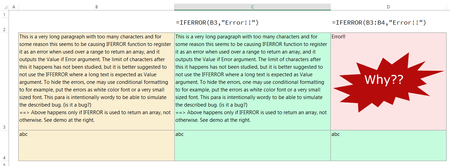

Thanks all, pls. allow me to reply you all in a single post,
SergeiBaklan Thanks for the suggestion, it seems a better way of trapping the IFERROR error. But strangely though, the other functions taking long text as input/output are working fine, e.g. i checked =UPPER(B3:B4) and it worked perfectly OK. The 255 array element length limit behaviour seems to be specific to IFERROR only.
Lorenzo Thanks, i confirm the D3 #VALUE! test. It shows the limit to be of 255 for IFERROR reading an array/range. But as i write above, the limit is not there for other functions like UPPER.
As for whether it is a bug or not, a formula behaving differently as per excel version, or not giving its output as an error or ##### string in case limit is reached and instead gives an unexpected non-intuitive output is certainly something which needs some attention, at least documentation. But that's for MS to do.
By Preview file, i meant clicking the file name in the original post instead of downloading the file. You may confirm that it works fine in the preview mode, by clicking the yellow highlighted in the original post.
HansVogelaar Detlef_Lewin Thanks, but i cannot drag fill or cannot avoid using IFERROR because my actual application of this function involves outputting an array. In this post i simplified the question leaving out that detail.

Excel has 30+ years history. Different functions was written by different people, even by different generations of people. Assumptions in implementations were taken long before dynamic arrays appeared, even if internally arrays always exist. Thus that could be different behaviour in similar situations. Rewrite all functions to meet all new realities that means to stop further Excel development. That is done for most critical cases only.