Forum Discussion

I need HELP with excel sheet sample below
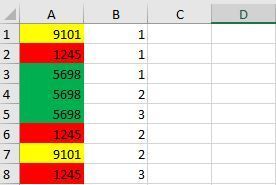

Hi,
You can paste following formula in cell B2 and drag it all the way down to get desired results:
=IF(IFNA(VLOOKUP(A2,$A$1:$A1,1,FALSE),1)=1,1,COUNTIF($A$1:$A1,$A2)+1)
Please let me know if it helps. I have also attached a file for your reference.
Regards,
Nikhil
 Anıl AdaşJul 03, 2018Brass Contributor
It works and your example was very helpful for me. Thank you so much!!
- Anıl AdaşJul 03, 2018Brass Contributor
Your formula is very good but I just found a mistake now.
If the number is 1 in A1 column, B1 column is filling automatically as 1 but it should be different for each 1.
In the excel sheet sample below, A-B column was done with formula, and D-E column was by hand so you can see the difference for number 1.
- SergeiBaklanJul 03, 2018Diamond Contributor
Anil, which of two suggested formulas do you mean? First one returns correct result
- SergeiBaklanJul 03, 2018Diamond Contributor
Hi Nikhil,
Why do you need VLOOKUP here? Simple COUNTIF as Takmil suggested works fine.
