Forum Discussion

How to sort with formula very challenging problem
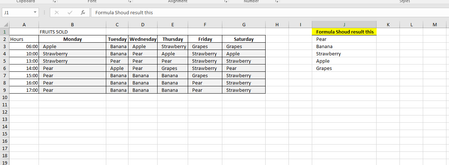
- Mar 23, 2018
Hello,
Indeed a challenging formula.
Here is what I could come up with. put this formula in J2 with control shift enter.
=INDEX($B$3:$G$9,MIN(IF(MAX(COUNTIF($B$3:$G$9,$B$3:$G$9)*NOT(COUNTIF($J$1:J1,$B$3:$G$9)))=COUNTIF($B$3:$G$9,$B$3:$G$9),ROW($B$3:$G$9)-MIN(ROW($B$3:$G$9))+1,"")),MATCH(MAX(COUNTIF($B$3:$G$9,$B$3:$G$9)*NOT(COUNTIF($J$1:J1,$B$3:$G$9))),(COUNTIF($J$1:J1,"<>"&INDEX($B$3:$G$9,MIN(IF(MAX(COUNTIF($B$3:$G$9,$B$3:$G$9)*(COUNTIF($J$1:J1,"<>"&$B$3:$G$9)-ROWS($J$1:J1)+1))=COUNTIF($B$3:$G$9,$B$3:$G$9)*(COUNTIF($J$1:J1,"<>"&$B$3:$G$9)-ROWS($J$1:J1)+1),ROW($B$3:$G$9)-MIN(ROW($B$3:$G$9))+1,"")),,1))-ROWS($J$1:J1)+1)*COUNTIF($B$3:$G$9,INDEX($B$3:$G$9,MIN(IF(MAX(COUNTIF($B$3:$G$9,$B$3:$G$9)*(COUNTIF($J$1:J1,"<>"&$B$3:$G$9)-ROWS($J$1:J1)+1))=COUNTIF($B$3:$G$9,$B$3:$G$9),ROW($B$3:$G$9)-MIN(ROW($B$3:$G$9))+1,"")),,1)),0))


Hi Flora,
If you have Excel 2010 or later the easiest way is to use Power Query (Get&Transform in 2016) - query your table, unpivot days columns, group by fruit name counting them and sort by count, land the result into Excel sheet.
Like attached.

Formula solution by Jamil worked for me.