Forum Discussion

How to move a cell value using an RTD formula (pulling in live updating data) when it changes?
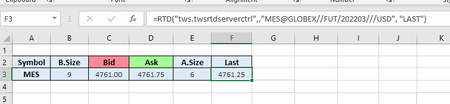

This is doable with a short event handler. Two Excel facts explain why the obvious approaches fail, then working code.
- RTD values arrive through recalculation, and recalculation does not fire Worksheet_Change — that event fires on edits, not recalcs. The event that fires on every RTD update is Worksheet_Calculate.
- Excel batches RTD updates. By default Excel updates RTD values application-wide at most once every 2,000 ms (Application.RTD.ThrottleInterval), so what you can capture is each updated value, not every tick the exchange printed. If you want finer sampling, run Application.RTD.ThrottleInterval = 250 once in the VBA Immediate window (per Microsoft the new value persists across Excel restarts).
With your live RTD price in F3, the code below keeps F4:F22 as the capture history — the 19 most recent prices, newest at the top, everything shifting down one row on each new price, oldest dropped. Right-click the sheet tab → View Code → paste into that sheet's module:
Private mLast As Variant

Private Sub Worksheet_Calculate()
    Dim v As Variant
    v = Me.Range("F3").Value2

    If IsError(v) Or IsEmpty(v) Then Exit Sub   ' RTD not connected / no value yet
    If Not IsNumeric(v) Then Exit Sub           ' ignore text/status values
    If v = mLast Then Exit Sub                  ' this recalc didn't change the price

    On Error GoTo CleanUp
    Application.EnableEvents = False            ' don't re-trigger this handler

    ' Shift history down one row: F3:F21 -> F4:F22 (old F22 falls off)
    Me.Range("F4:F22").Value2 = Me.Range("F3:F21").Value2

CleanUp:
    mLast = v
    Application.EnableEvents = True
End Sub
Why the guards matter:
- Application.EnableEvents = False prevents the infinite loop: writing to F4:F22 can trigger another recalculation, which would re-fire Worksheet_Calculate. The On Error … CleanUp pattern guarantees events get re-enabled even if the write fails.
- v = mLast makes the handler a no-op when the sheet recalculated for any other reason (some other formula, another RTD cell). It also means two successive identical prints record once. If you want every update regardless, compare a timestamp field from your feed instead of the price.
- To timestamp each capture, keep a parallel column: add Me.Range("G5:G22").Value2 = Me.Range("G4:G21").Value2 and then Me.Range("G4").Value = Now just before CleanUp. G4 then holds the capture time of the value in F4.
This works with any RTD feed, including the TWS RTD sample you're using. One scope note on that sample: per IBKR's docs, "only top-level market data is supported via TWS RTD Server API" — quotes only, so account values, positions, and orders won't arrive through it. Disclosure: I develop StreamXLS (streamxls.com), a commercial RTD server for the TWS API that adds the account, position, and order layer; the capture code above works unchanged with either server.