Forum Discussion

How to add separator (comma) inside a formula?
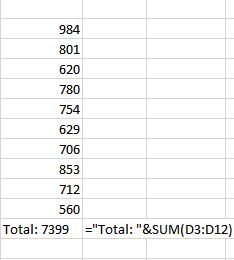
- Feb 06, 2017
Haytham, format the SUM as well, like ="Total: " & TEXT(SUM(D3:D12),"#,##0_ ;-#,##0 "). If I understood your question correctly...

Thank you Mr. Baklan, this is exactly what I want :smileyvery-happy:
But I have noticed another code gives the same result.
The code is: #,##0
What's the difference between it and the code you mentioned?

Actually no difference, for me it was faster enter the formula ans copy/paste it here. In general, for whole numbers you may use something like TEXT(A1,"#,#"). Another story if you would like to make different formatting for positive and negative numbers, add text and or colors into formatting, etc - all that additional symbols matter.
In particular, you may format your cell with =SUM(D3:D12) as "Total: "#,### (enter this into the Custom format of the cell) that gives the same result.
Comma just separates your number on thousans, millions, billions, etc.
More about formatting is here
https://support.office.com/en-us/article/Number-format-codes-5026bbd6-04bc-48cd-bf33-80f18b4eae68
and i guess in many other places
 suresh_k8309Nov 03, 2019Copper Contributor
please help me fix this formula
=("5% VAT ON AED")&ROUND(SUM(H36:H37),2) ( the output in the sum i need to add Coma like in accounting format)
Please help me with this
- SergeiBaklanNov 04, 2019Diamond Contributor
As variant you may apply desired accounting format to the cell, Ctrl+1, select Custom and add your text in front of each formatting block
Alternatively wrap ROUND with TEXT function applying accounting format string for your locale.
 beck102015Sep 17, 2024Copper ContributorHi, I was hoping you could help me with getting a comma into my formulas/cells as well?
They're two formulas that are roughly the same, and they're more about formatting data from other cells in a specific way. While the numbers in the other cells that are being sourced/cited have the separator comma, the result in the formula does not. I've tried various ways of using TEXT to add it, and other standard formatting options, but I think the way the numbers are formatted in the final cell with these 'formulas' is confusing the Excel commands.
The formulas (as given to me) are:
=E4&" / "&"$"&F4&" "&G4
=L4&" / "&"$"&M4&""
The results look like, e.g.:
4 / $2386 -248
3 / $8586
So is there either a way to add a separator comma to those $ numbers, OR is there a better way to achieve these results in a single cell?
Thanks!