Forum Discussion

Help with VBA Code
 May 13, 2025
That looks great and works when I added it to the workbook! Thank you for your help!

So I chose to do this in a worksheet function. This can be a unique LAMBDA function and then you can have multiple LAMBDA functions for different games. In this case I made a function that should work for BOTH those games (i.e. take SUM and subtract worst Score for each hole)
here is a breakdown of the function:
=LET(pTeams, Table1[Team '#], pHDCP, Table1[HDCP], pRaw, HSTACK(Table1[[1]:[9]],Table1[[10]:[18]]),
HDCP, HSTACK(H12:P12,R12:Z12), Par, HSTACK(H13:P13,R13:Z13),
NetScores, pRaw-(pHDCP>=HDCP),
NetTeam, MAP(UNIQUE(pTeams),LAMBDA(I, SUM(BYCOL(FILTER(NetScores,pTeams=I), LAMBDA(c, SUM(c)-MAX(c)))))),
HSTACK(UNIQUE(pTeams),NetTeam))
So I did format the raw data as a TABLE but not required.
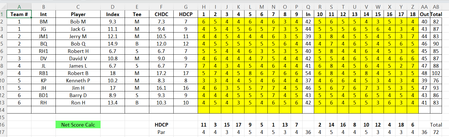
Row 1 gets the column of Team #s, the column of player HDCP, the player Raw scores (1-18 without the 'IN')
Row 2 gets the HDCP (again without the extra space) and the Par (but I just realized I forgot to subtract Par, but that is easy enough)
Row 3 finds the Net Score for EACH player for EACH hole.
Row 4 loops through each TEAM and then loops through each HOLE and takes the SUM-MAX to find the Team's score for that hole
Row 5 outputs the list of Team#s and final Scores
That looks amazing! However, I don't understand the LAMBDA function so it is a great opportunity to learn!
I simplified the table I originally sent, so I copied the actual sheet into your workbook (only values as many of the cells are filled with formulas and data from other sheets). If possible, can you transfer this function to the sheet2? The output can be anywhere since I will copy the values to a different location.
Hopefully I will be able to copy your version directly it into my workbook without changing any of the cell addresses.
The workbook is set up to handle 45 golfers, if more or less golfers show up, will the table need to be adjusted in the formula or will the formula return a null value? This is why I have a player count at the top of the page so I can adjust the tables and ranges based on this value.
Again, thanks and I envy your skills!
- m_tarlerMay 10, 2025Silver Contributor
first off, yes this new forum software has some delay/scan process that can sometimes take quite some time which is annoying.
second, i love and appreciate the attitude and hope you learn LAMBDA and new functions that can make your life easier. They are not too hard to learn when you break them down and learn them a little at a time.
I am attaching the updated sheet. you will notice the only thing I did was change the 1st 2 lines to point to the new ranges and used regular range references instead of the (table) structured reference.
- schlag58May 10, 2025Tin Contributor
Unfortunately, the solution does not run in my version of Excel. Currently I am using:
Microsoft® Excel® 2021 MSO (Version 2504 Build 16.0.18730.20122) 64-bit
When I downloaded your sheet, it looked great, but the moment I started clicking around, the results displayed as #NAME? error. After some digging, I believe the solution contains a function not supported in my version.
Any other ideas?