Forum Discussion

robrobrobrob
Sep 29, 2023Tin Contributor
help with pivot table
hello guys, i am new to pivot tables so please excuse me if this is easy for you. i have an excel sheet that contains IT tickets with their resolve time and response time. which from i created a pi...
- Sep 29, 2023
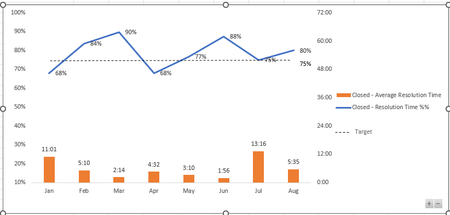
That's with PivotTable based on data model if your Excel supports it. Creating PivotTable check "Add data to data model", create measures you need, like for such sample
as
Average Total:=AVERAGE(Table1[Time])
Average < 1 Hr:=CALCULATE( AVERAGE(Table1[Time]), Table1[Time] < 1/24 )
create chart based on them and add cosmetic.

SergeiBaklan
Sep 29, 2023Diamond Contributor
That's with PivotTable based on data model if your Excel supports it. Creating PivotTable check "Add data to data model", create measures you need, like for such sample
as
Average Total:=AVERAGE(Table1[Time])
Average < 1 Hr:=CALCULATE( AVERAGE(Table1[Time]), Table1[Time] < 1/24 )
create chart based on them and add cosmetic.
 robrobrobrobOct 06, 2023Tin Contributorthank you for this , it's wonderful , i was able to do it on my excel , however ,i'd like to show the NUMBER of tickets resolved under 1 hour and the NUMBER of tickets resolved over 4 hours
- SergeiBaklanOct 07, 2023Diamond Contributor