Forum Discussion

Help with excel formula
 Jul 11, 2022
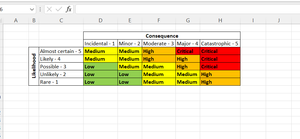
This is the formula in cell E11 in the attached example. The formula is copied down to cell E24 and the dropdowns are in range C11:D24. Conditional formatting is entered for range E11:E24.
=IFERROR(INDEX($C$3:$G$7,MATCH(C11,$B$3:$B$7,0),MATCH(D11,$C$2:$G$2,0)),"")
Hello and thank you. I hope you are well too. In the attached file i've entered formulas which return the expected results if i correctly understand what should be done.

Is there a way that the result can be in the same colour? ie: Medium bold & yellow, Low bold & Green?
Thank you again and again.
- Nikkie1977Feb 24, 2023Copper Contributor
OliverScheurich Hello. I hope you are well? Can i please get your advise again. I know its not a complex formula but i just cannot work it out.
I have attached our reporting schedule. On a monthly report using a pie chart, I need to report on how many hours were spent on each department.
For example: For the month of Feb, we spent 9 hours assisting the BD department. The >1 means under 1 hour which i assume we need to count as 1 hour? How do i total up the hours for each department without duplicating info. I hope i am making sense?
I look forward to hearing from you. Thank you.
- OliverScheurichJul 22, 2022Gold Contributor
You are welcome. I've learned a lot from the solutions of the experts of this community. In the microsoft support page there are explanations of formulas for example if you are interested in the CHOOSE function:
CHOOSE function (microsoft.com)
In the attached file i've added conditional formatting for the results in the TOTAL RISK LEVEL PER CATEGORY cells and in the TOTAL CONTRACT RISK LEVEL cell.