Forum Discussion

Help with data fields
- Nov 22, 2022
Actually, it occurs to me that if you are not in a position to upgrade to the more current version of Excel, you may be almost as well served by just doing this filtering manually. Are you aware of the tool bar selection, under "Data" called Filter? I've highlighted the section of the tool bar here in this image.
What that does is give you the ability to "manually" filter the data in a table such as yours by selecting the value you want to use.
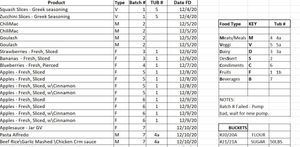
Notice the little "filter" symbol in the header row. I've used it to select "1" under TUB #, and that filters the entire table so that only the rows with "1" in that field are shown.
Notice the row designations along the left side: there are rows missing now, rows that contain other Tub# values.
You can then copy them manually to a separate sheet, as I've done in the attached file. This is nowhere near as efficient as the FILTER function, which operates dynamically and in real time.....but if your need is to get occasional extracts like this, it may serve you adequately.

I actually realized it wasnt vr 2016 but 2019 .
I did uninstall 2019 and installed 2021
had the same results. Yes I read the bad news part also 🙂 Thanks again for your efforts! Outstanding
Jon Scott
USMC Ret.

I did uninstall 2019 and installed 2021 had the same results
I hope you mean that, with the 2021 version of Excel installed, the FILTER function version then was working for you. That is a function that has lots of applications.