Forum Discussion

Rachel1950
Oct 02, 2024Brass Contributor
help with a formula please
Hi, Im hoping you could please help me with this formula as I cant do it after lots of tries! I have 2 sheets. One is a front page and one is a data page. The front page contains a unique numbe...
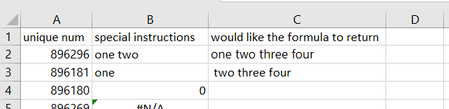
- Oct 02, 2024
If you are on Excel 365 it could be
=LET(
   number, data!$A$2:$A$29,
   instruction, data!$B$2:$E$29,
   uniqueNumber, $A$2:$A$22,
   getInstruction, LAMBDA(num,
     LET(
        f, FILTER(instruction, number=num),
        n, BYROW(f, LAMBDA(v, SUM(--(v<>"") ) ) ),
        IFERROR(TEXTJOIN(" ",, TAKE( FILTER(f, n=MAX(n) ), 1 ) ), "" )
    )
   ),
  MAP( uniqueNumber, getInstruction )
 )


OliverScheurich
Oct 02, 2024Gold Contributor
=IFNA(INDEX($L$2:$L$30,MATCH(1,($G$2:$G$29=A2)*(LEN($L$2:$L$29)=MAX(LEN(IF(A2=$G$2:$G$29,$L$2:$L$29,0)))),0)),"")
Does this return the intended result? The formula must be entered as an arrayformula with ctrl+shift+enter if someone doesn't work with Office 365 or Excel for the web or Excel 2021.
 Rachel1950Oct 02, 2024Brass Contributorthank you for your help and it would produce the required information that is needed if I combined all the data in one sheet.