Forum Discussion

Help sorting in Excel
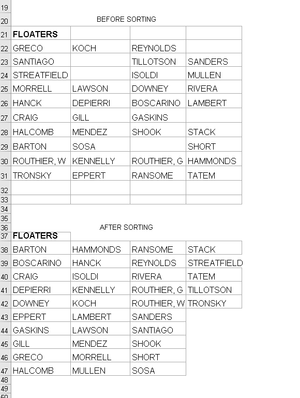

Would adding an index column and unpivoting other columns involve fewer queries?

- SergeiBaklanAug 04, 2020Diamond Contributor
To play with coding
let Source = Excel.CurrentWorkbook(){[Name="tblNames"]}[Content], SortedSource = Table.FromColumns( List.Split( List.Sort( List.Distinct( List.RemoveNulls( List.Union( Table.ToColumns(Source) ) ) ) ), Table.RowCount(Source) ), Table.ColumnNames(Source) ) in SortedSource- PeterBartholomew1Aug 04, 2020Silver Contributor
The is nothing special about the result; the point is that this was the first time I had ever put together M code using the advanced editor!
let
    Source = Excel.CurrentWorkbook(){[Name="tblNames"]}[Content],
    SortedList = List.Sort(
        List.Distinct(
            List.RemoveNulls(
                List.Union(
                    Table.ToColumns(Source)
                )
            )
        )
    ),
    n = 1+Number.IntegerDivide(List.Count(SortedList),4),
    LoadToTable = Table.FromColumns(
        List.Split(SortedList,n),
        Table.ColumnNames(Source)
    )
in
    LoadToTable
Thank you for the model code and guidance.
- SergeiBaklanAug 04, 2020Diamond Contributor
The only what is discussable here is
n = 1+Number.IntegerDivide(List.Count(SortedList),4)why the magic 4 appeared. But that's not clear from the specification - shall resulting table be the same size as the source, or or only same number of columns, or some number of rows and doesn't matter how many columns. If 4 is predefined when no problems, otherwise it shall be calculatable.
- PeterBartholomew1Aug 04, 2020Silver Contributor
"Even if LET() is on Current (Preview) now I still avoid to use it in MTC discussion"
I was going to say that was because you are more responsible than I, and simply seek to help, whereas I look for challenges that allow me to develop the techniques I can apply to a range of problems.
With your nested PQ solution, I am not so sure! Whereas, with the LET function, I introduced local names to provide documentation and remove nesting, you have travelled a similar road in the opposite direction, albeit with a striking indentation pattern. I expect Riny_van_Eekelen coped just fine, but it took me a while before I settled on reading from the deepest nesting outwards and I also had to come to terms with some list methods that I would not be able to access from the GUI!
I still have the feeling that I am not going to become fluent with such a style anytime soon!
Thanks anyway.
- SergeiBaklanAug 04, 2020Diamond Contributor
PeterBartholomew1 , if I do this query from scratch I'd do it approximately the same way as Riny_van_Eekelen did. Reasons - more UI is better for shared solutions; UI is usually better from maintenance point of view. Plus from performance point of view Power Query is better optimized to work with tables rather than with lists. However, performance is half a technology, another half is the art. Approach depends on concrete case.
Nested list functions are only to demonstrate alternatives. I fully agree, from usability point of view same code organised by steps is much better
let
    Source = Excel.CurrentWorkbook(){[Name="tblNames"]}[Content],

    combineColumnsInOneList = List.Union(Table.ToColumns(Source)),
    removeNullsFromList     = List.RemoveNulls(combineColumnsInOneList),
    removeDuplicates        = List.Distinct(removeNullsFromList),
    sortList                = List.Sort(removeDuplicates),
    rowsInTable             = Table.RowCount(Source),
    splitListOnFutureColumns= List.Split(sortList,rowsInTable),
    generateSortedTable     = Table.FromColumns(
        splitListOnFutureColumns,
        Table.ColumnNames(Source)
    )
in
    generateSortedTable
Nested variant is bit better only from development point of view, at least for me.
- PeterBartholomew1Aug 04, 2020Silver Contributor
That would do it! 🙂
