Forum Discussion

jerbear
Jul 30, 2020Copper Contributor
Help sorting in Excel
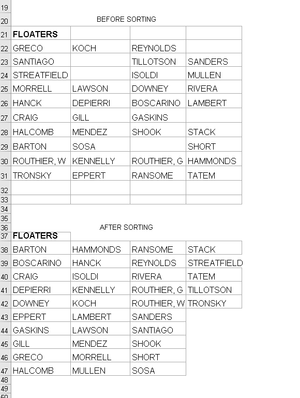
I need help getting the after sort results in my photo.

Riny_van_Eekelen
Aug 04, 2020Platinum Contributor
jerbear In your example you have a range of 10 rows and 4 columns containing 35 names an 5 blanks. Your aim is to sort these in alphabetical order and display them side-by-side in groups of max 10.
I suspect that your real situation isn't as straightforward, but am offering you a power query (PQ) solution that does exactly what you ask for in the example. I am fully aware that this is not the most elegant or dynamic solution. A real expert in PQ can probably come-up with a better way.
- PeterBartholomew1Aug 04, 2020Silver Contributor
Would adding an index column and unpivoting other columns involve fewer queries?
- Riny_van_EekelenAug 04, 2020Platinum Contributor
- SergeiBaklanAug 04, 2020Diamond Contributor
To play with coding
let
    Source = Excel.CurrentWorkbook(){[Name="tblNames"]}[Content],
    SortedSource = Table.FromColumns(
        List.Split(
            List.Sort(
                List.Distinct(
                    List.RemoveNulls(
                        List.Union(
                            Table.ToColumns(Source)
                        )
                    )
                )
            ),
            Table.RowCount(Source)
        ),
     Table.ColumnNames(Source)
    )
in
    SortedSource

